I have 847 browser tabs open right now.
Not literally. But you know the feeling. You’ve got 12 AI tools you’re paying for, a Notion dashboard that’s somehow both empty and overwhelming, and a Claude Code setup that’s been “optimised” so thoroughly it can barely decide what to do when you say good morning.
This is the skills problem. And it’s worse than you think.
How We Got Here (The Part Where Everyone Nods Knowingly)

When Anthropic dropped the skills architecture for Claude Code, it was genuinely exciting. Finally — a way to give your AI agent real, repeatable, business-specific capabilities. Not just vibes and good intentions, but actual structured expertise it could reach for at the right moment.
Then the internet did what the internet does.
Within weeks, people were posting screenshots of their setups with 300, 500, 1,000 skills installed. Entire Reddit threads dedicated to “my complete Claude Code skills pack.” Marketplaces like SkillsMPP indexing over 280,000 skills from GitHub alone. The message, whether explicit or not, was clear: more is better. Load it all. Let Claude figure it out.
I fell for it too, briefly. Then I started actually measuring things.
What Skills Actually Are (This Part Matters)
Before we get into why most people are using them wrong, let’s make sure we’re aligned on what they actually are. Because “good system prompts” is what I keep seeing, and it’s only half true.
A skill is a folder. Inside that folder: a skill.md file that acts as your standard operating procedure — the process, the step-by-step, what good looks like and what to avoid. Then optional supporting files: reference documents with your actual knowledge base, scripts that can execute, assets that show what the output should look like.
The skill.md is your SOP. The reference files are your expertise.
Here’s the bit that changes everything: Claude doesn’t load the whole skill upfront. It works on progressive disclosure. The only thing loaded into the initial prompt is the YAML front matter — a name and description, essentially a summary card. Claude reads all the summary cards, decides which skill applies, and only then loads the full process and reference files.
This is elegant. And it’s exactly why the “install everything” crowd is actively making their agents worse.
The Maths of a Cluttered Skills Library (Or: Why Your Agent Is Getting Dumber)
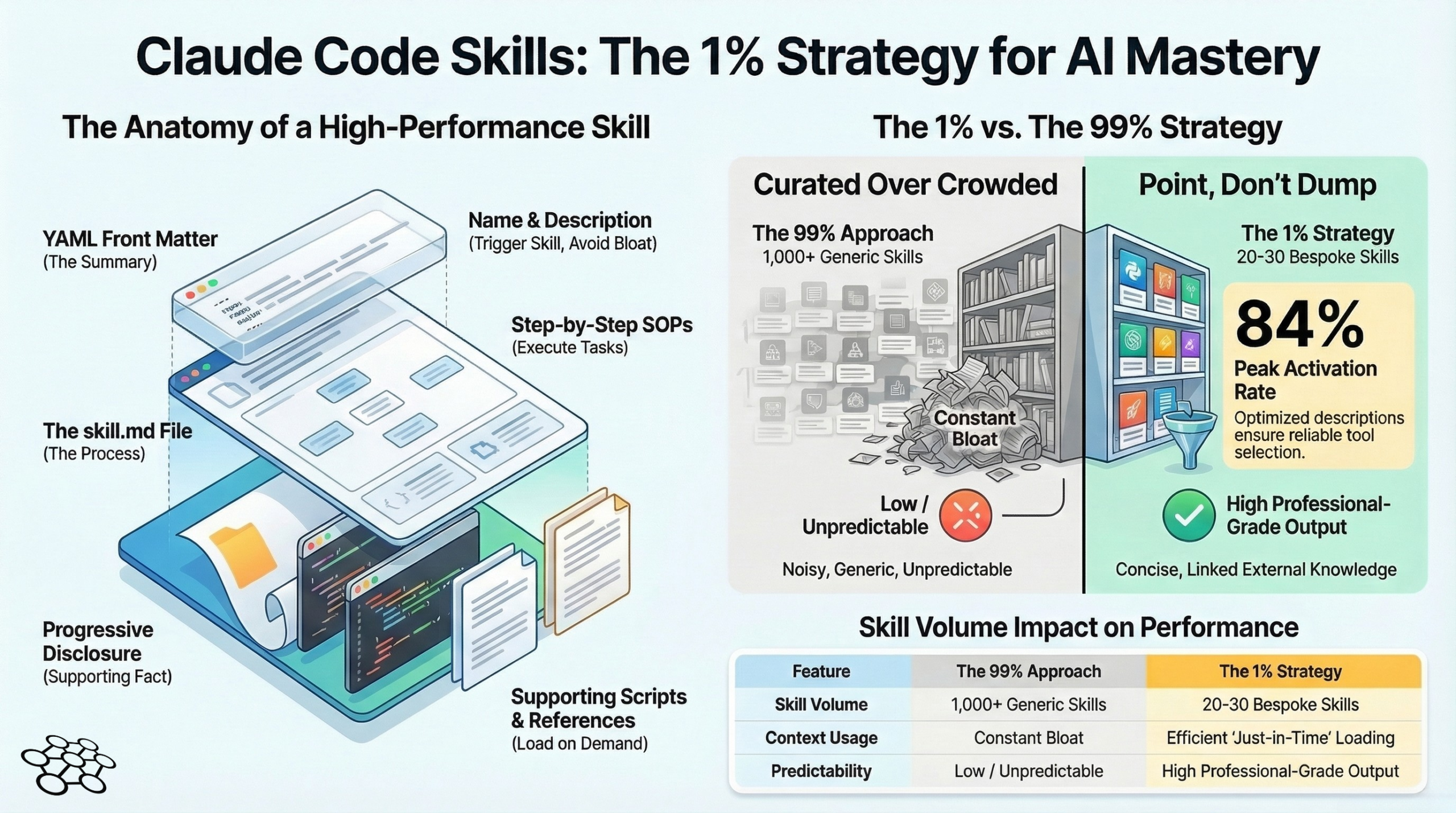
Anthropic’s own documentation has a 15,000 character limit for the full available skills list that gets scanned. Fill that with 500 generic skills and you’ve done two things: blown through the character budget, and created a menu so noisy Claude can barely read it.
Someone actually ran activation testing on this — how often does Claude correctly recognise and trigger the right skill? With a basic setup and a mediocre description, activation was as low as 20%. One in five times. Even with properly built skills and optimised descriptions, the ceiling was around 84%.
Now imagine you’ve got two SEO skills in there. Same use case, different authors, slightly different triggers. Claude picks one at random. Your outputs vary wildly. You blame the model. The model isn’t the problem.
The “install everything” approach isn’t giving your agent superpowers. It’s giving it analysis paralysis.
What I Actually Run (And Why the Number Shocked Me)

I’ll be specific here because I think the number is the point.
For AIQ — my autonomous multi-agent platform running Jarvis, Archie, and Dexter across a VPS stack — I use roughly 20 to 25 skills across the system. That’s it. A handful are Anthropic’s official ones (PDF manipulation, DOCX generation — they’re well-built and I’m not going to reinvent those). A few are community builds I’ve heavily modified. The rest are custom, built from scratch around my actual workflows.
Each one has a specific, unambiguous trigger description. Each one separates process (in the skill.md) from knowledge (in the reference files). Each one has been tested and iterated, and I know exactly which part to update when the output isn’t right.
When Jarvis orchestrates a task from Telegram through the HMAC-signed bridge to Archie, the last thing I need is skill ambiguity slowing down or confusing that chain. Precision matters. The trust infrastructure I’ve built — cryptographic signing, append-only audit trails, verified agent identity on every operation — that’s all undermined if the agent layer above it is making random guesses about which skill to activate.
Tight, curated, specific. That’s the only configuration that’s worked at production scale.
The Part Nobody Builds (Your Reference Files)
This is where the actual value lives, and it’s almost universally skipped.
The skill.md is your process. Fine. Easy to write. But the reference files are where you put your expertise — your brand voice, your client knowledge, your years of context about how your business actually works. That’s the part that makes a skill yours rather than a generic template anyone could download.
Take my writing style skill as an example. The skill.md routes the request and lays out the steps. The reference file contains a detailed style guide: banned words (there are a lot of them), sentence rhythm, structural patterns, the specific things I’ve flagged in past drafts. A community skill can’t give you that. No marketplace has that. It exists because I built it, and it reflects the actual decisions I’ve made in actual work.
The same logic applies to everything domain-specific. A lead generation skill without your ICP, your product context, your pricing and positioning is just a generic outreach template wearing a skill costume. Useless at best, confidently wrong at worst.
How to Actually Build One (The Framework That Works)
The structure I use on every skill, no exceptions:
Front matter (YAML) — Name and description. The description is your activation trigger. Be specific. “When the user needs to write something” will fire randomly. “When the user asks to write, rewrite, or edit a professional email to a client, partner, or internal stakeholder” will fire correctly.
Skill.md body — Process only. Step by step. What to check first, what to load, what order to work in, what good output looks like. Point to reference files; don’t dump their content here.
Reference files — Knowledge only. Your expertise, your examples, your brand context. Load them conditionally from skill.md — if the task is X, load reference A; if it’s Y, load reference B. This keeps context tight even when the knowledge base is extensive.
Scripts — Only when you need execution. If the skill needs to actually run something, scripts are the right tool. Otherwise, leave them out.
When something goes wrong — and it will — this structure tells you exactly where to look. Output doesn’t match what you expected? Check the skill.md process. Output uses the right process but gets the content wrong? Check the reference files. Debugging becomes logical instead of a guess.
The Bigger Picture (Because This Is About More Than Productivity)
Here’s what I think is actually happening with the skills explosion.
The people building the best AI-powered workflows right now aren’t winning because they’ve installed the most skills. They’re winning because they’ve built institutional knowledge into their agent stack. That’s the moat. Not the AI models — those are commodities, they change every six months, every competitor has access to the same ones. The moat is the expertise layer you’ve built on top.
Companies like Stripe and Cloudflare and Vercel are launching their own skills specifically because they understand this. Not to democratise anything — to make their platform knowledge irreplaceable in your workflow. Once your agents are running Stripe’s skill, built around Stripe’s documentation and best practices, switching costs just went up.
For individual operators, this cuts the other way. The expertise you encode into your skills — your process knowledge, your client context, your domain experience — that’s what makes your AI output genuinely yours rather than generic. Anyone can prompt Claude. Not everyone has 15 years of enterprise technology consulting encoded into a reference file that their agent draws on every single time.
The One Number to Keep in Mind
I said activation rates earlier. Let me leave you with that.
20% activation with a poor setup. 84% maximum with a well-built one. Running 500 skills, even generously assuming every description is decent, that 84% ceiling collapses fast as the noise builds.
20 curated skills, sharp descriptions, tight process, real reference knowledge. That’s the configuration that holds.
Right. Your move.
I’m building AIQ in public — a fully autonomous multi-agent platform running on a single VPS for under 30p a day. If you want to follow the build, including what’s working, what’s broken, and what I’d do differently, subscribe below.